Thursday, November 3, 2011

Paper Reading #27: Sensing cognitive multitasking for a brain-based adaptive user interface


Sensing Cognitive Multitasking for a Brain-Based Adaptive User Interface


Authors - Erin Treacy Solovey, Francine Lalooses, Krysta Chauncey, Douglas Weaver,  
Margarita Parasi, Matthias Scheutz, Angelo Sassaroli, Sergio Fantini, Paul Schermerhorn
Audrey Girouard, and Robert J.K. Jacob


Authors BiosErin Treacy Solovey is a PhD candidate at Tufts University in the Human-Computer Interaction Research Group.
Francine Lalooses is a PhD candidate at Tufts University and has a Bachelor's and Master's degree from Boston University.
Krysta Chauncey is a post doctorate researcher at Tufts University.
Douglas Weaver earned a doctorate degree from Tufts University.
Margarita Parasi was earning a Master's degree at Tufts University at the time of this paper's publication.
Matthias Scheutz is a PhD student at Tufts Universtiy.
Angelo Sassaroli is a research assistant professor at Tufts University and earned a PhD from the University of Electro-Communication.
Sergio Fantini is a professor in the Biomedical Engineering Department at Tufts University.
Paul Schermerhorn is a post doctorate researcher at Tufts University from Indiana University.
Audrey Girouard is an assistant professor at The Queen's University and earned a PhD from Tufts University.
Robert J.K. Jacob is a professor at Tufts University.


VenueThis paper was presented at the CHI '11 Proceedings of the 2011 annual conference on Human factors in computing systems.


Summary


Hypothesis - In this paper, researchers state that multitasking has become commonplace in the work environment but software designers have struggled with developing systems to capitalize on this fact. The hypothesis is that through studies and experiments, the researchers will be able to develop a system capable of determining a certain cognitive state a user is in and adjust for maximum efficiency.


Content - The 3 scenarios of multitasking are:

  • Branching - Task switching while keeping secondary task in memory
  • Dual-Task - Frequent changes in task that do not require memory
  • Delay - Secondary task can wait for primary task to finish
The 2 conditions of branching are:
  • Random Branching - User does not expect task
  • Predictive Branching - User expects task


Methods - 1) The preliminary study consisted of determining the cognitive states of 3 participants using fNIRS. The experiment was modeled after one Koechlin did earlier.


The following experiments use human-robot interaction (HRI) to study the usefulness of the system proposed by the researchers. The tasks being performed require both the human and robot and cannot be done a single entity. The basics of the task is sorting rocks and communicating with the robot regarding its location.
2) The conditions and actions for the study are as follows:

  • Delay - If 2 classification messages are consecutive then put in the same bin otherwise put in a new bin. Begin a new transmission for all location messages.
  • Dual Task - 
  • Branching - For classification messages do the same as the Delay condition. For location messages do the same as the Dual Task condition.

12 participants were selected for the study. Participants practiced the procedure beforehand to get better at the tasks to make sure that they were thinking properly before applying the fNIRS sensor. The user had to perform 10 40-second trials of each condition.
3) 12 participants participated in the second study as well. They performed the same experiment as the second one but the stimuli was ordered as follows for the 2 types of branching:

  • Random Branching - Classification and location messages are received pseudorandomly.
  • Predictive Branching - One classification message were sent after every 3 messages.


Results - 1) The preliminary study showed to be accurate enough for the researchers to continue.
2) A significant difference in response time was found between delay and the other two conditions but no difference was found between the other two. They also found that the 3 conditions had very distinct hemodynamic responses and could be measured that way.
3) No significantly different results were found for response time or accuracy.


Conclusion - The researchers presented a conceptual design of a system that would take data from the fNIRS sensors and adjust the user interface to appropriately handle the cases being dealt with. The researchers conclude by saying that this thought process should be further explored and tested and they believe that they also built the case for HRI to be relevant to the HCI field.


Discussion


I think the researchers accomplished their goal of proving the hypothesis but did it in a very cumbersome manner that was thoroughly unclear. The paper felt disjoint at times and seemed to show where some of the researchers broke off and did their research separately and then applied it later. The results sections were also extremely unclear as it was never explicitly explained well as to what they were looking for and then they never said if the differences meant anything other than that they were different.

Tuesday, November 1, 2011

Paper Reading #26: Embodiment in brain-computer interaction


Embodiment in Brain-Computer Interaction


Authors - Kenton O’Hara, Abigail Sellen, and Richard Harper


Authors Bios - Kenton O’Hara is a Senior Researcher at Microsoft Research and works in the Socio Digital Systems Group.
Abigail Sellen is a Principal Researcher at Microsoft Research and has a PhD from The University of California, San Diego where she studied under Don Norman.
Richard Harper is a Principal Researcher at Microsoft Research and has a PhD from Manchester.


Venue - This paper was presented at the CHI '11 Proceedings of the 2011 annual conference on Human factors in computing systems.


Summary


Hypothesis - In this paper, researchers will present a deeper understanding of Brain-Computer Interaction (BCI) as it relates to practical use and what users think of such technology. The hypothesis is that the researchers will gain useful insight as to when and where BCI should be used for maximum effectiveness and report on current user perspectives on such devices.


Methods - To determine user perception of BCI, the researchers conduct a study that uses the MindFlex game. MindFlex is a commercially available product that measures a user's "focus" and uses that measurement to control a fan that can raise or lift a ball in the air. The more focus detected, the faster the fan blows, the higher the ball floats. 16 participants were found for the study and were in 4 distinct social groups meaning they knew each other prior to the study. Each group was given a MindFlex game for one week, video recording every play session which was to be analyzed by the researchers once returned.


Results - Upon examination of the video submissions, the researchers found many properties they believe to be common to BCI use especially in social settings. They found the following:

  • Bodily Orientation and Focus - Participants often moved their body or performed physical gestures in an attempt to control focus. Clenching fists and steady gazes on the ball were usually signs of focus whereas wandering eyes and hands were associated with reducing focus. An important aspect of the game was the ability to hear the fan when looking elsewhere allowing for monitoring even when not paying attention
  • Mental Imagery and Narrative - Participants created narratives to help control the ball at times even though they had nothing to do with the game directly. For example thinking of things that fly was a common strategy for raising the ball but it wasn't the thought that was raising the ball, it was the increased concentration that went along with thinking about it. The converse did not apply to this game as thinking of things lowering only increased concentration also increasing the ball's altitude. These concepts should be considered when designing games and other applications using BCI as it seems people will try to apply their own intuitions to the control method.
  • Intentionality and Invisibility - Communication while using BCI can be complicated as the action being performed can be perceived as a form of communication so, for example if a spectator gives a user a suggestion and the user does not respond, the spectator will think they are being ignored and continue to suggest or ask if the user understood. If no discernible action is being performed while playing the game, some users felt the need to communicate what was going on by saying it out loud or by gesturing for what they intend to do.
  • Play as Performance - Some users felt the need to make operating with BCI more entertaining by exaggerating gestures or verbally commenting. 
  • Spectatorship Verabalisations and Play - The genericity of the MindFlex game allowed for unique interactions between friends and family members as they are able to make inferences about certain thoughts based on the movement of the ball or maybe even help the user by distracting them with something that they know will work.


Content - The first point made by the researchers is that physical and social interactions need to be considered when designing BCI applications as these will be important for communicating what is only within a person's head. The researchers also point out that one way of expanding BCI application is to build in physical interaction that would help with communicating intentions and help people think appropriately. A downside to a more narrow interaction scheme is that open interpretation is limited which limits unique social interactions which could be a major selling point for BCI applications.


Conclusion - The researchers conclude by saying that future BCI design needs to incorporate physical and social aspects along with the mental. This paper has shown that these aspects are what set BCI games apart from traditional thinking.


Discussion


I think the researchers achieve their goal of broadening the concept of BCI application design to include physical and social interactions which will hopefully lead to more research of this kind. I think the fact that MindFlex is already available to the public is a huge step forward for this technology and will bring much needed public interest to the topic.

Monday, October 31, 2011

Paper Reading #25: Twitinfo: aggregating and visualizing microblogs for event exploration


TwitInfo: Aggregating and Visualizing Microblogs for Event Exploration


Authors - Adam Marcus, Michael S. Bernstein, Osama Badar, David R. Karger, Samuel Madden, and Robert C. Miller


Authors BiosAdam Marcus is a graduate student at MIT and researches with the Artificial Intelligence Lab.
Michael S. Bernstein is a graduate student at MIT with emphasis in human computer interaction.
Osama Badar is a student at MIT and also researchers with the Artificial Intelligence Lab.
David R. Karger is a professor at MIT and has a PhD from Stanford University.
Samuel Madden is an Associate Professor in the EECS department at MIT.
Robert C. Miller is an associate professor at MIT and leads the User Interface Design Group there.


VenueThis paper was presented at the CHI '11 Proceedings of the 2011 annual conference on Human factors in computing systems.


Summary


Hypothesis - In this paper, researchers discuss information gathering about events using twitter and why its current implementation can lead to unbalanced and confusing tweets being displayed. The hypothesis is that the researchers can build a system that organizes and displays information from twitter in a much more coherent and easily understood manner that people can use to understand events quicker than ever.


Content - The TwitInfo System consists of:

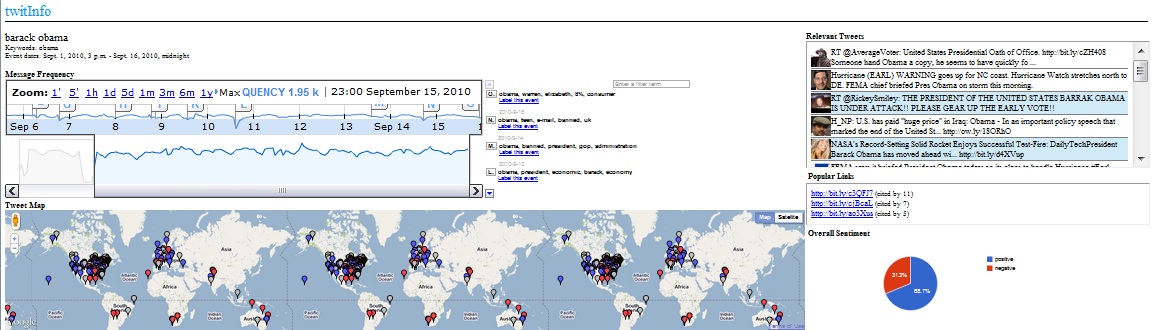
  • Creating an Event - Users enter in keywords (like Soccer and team names like Manchester) and label the event in human readable form(Soccer: Manchester)
  • Timeline and Tweets - The timeline element displays a graph showing the popularity of the keywords entered in and detects peaks which are then marked as events which users can click on which singles out relevant tweets made during that time
  • Metadata - Displays overall sentiment (positive or negative) towards the subject matter, shows a map of where tweets are coming from, and gives popular links cited in the tweets
  • Creating Subevents and Realtime Updating - Users can create subevents by selecting an event on the timeline and labeling it separately and the system updates as often as twitter does allowing users to always have up to date infromation.
Some technical contributions made by TwitInfor are:

  • Event Detection - Keeps track of a mean twitter rate and when the rate is significantly higher than the mean, an event is created
  • Dealing with Noise - Keywords that have higher volume than other keywords in the same event are dampened by comparing each keyword with its global popularity and acting accordingly
  • Relevancy Identification - Relevant tweets are determined by matching keywords and looking at how many times it has been retweeted
  • Determining Sentiment - The probability that a tweet is positive and negative is calculated and if a significant difference is present then it is added to whatever sentiment it is more like


Methods - 1) The researchers first evaluate the validity of their event detection algorithms by examining on their own major soccer and earthquake events of interest without looking at twitter. They will compare these findings with what TwitInfo returns for the two subjects.
2) 12 people were selected for a user study and evaluation of TwitInfo's interface. The participants were asked to look for specific data first such as single events and comparing them. They were then asked to gather information about a topic for 5 minutes and present their findings. The final thing required of the participants was to have an interview with the researchers to discuss the system as a whole. 


Results - 1) The researchers found that the system was quite accurate but reported many false positives. They also found that interest is a significant factor in finding information meaning an event that happens in a minor area or an undeveloped area is more likely to go unnoticed in TwitInfo.
2) The researchers found that most people were able to give very insightful reports on current events even with little to no prior knowledge of the events being studied. Common usage of the system found that many people skimmed the event summaries to get an overview of what happened when. The timeline was found to be the most useful part of the interface for most participants. Users also reported that the map would have been more interesting if volume was reflected in the display so as to show where events had the greatest impact. 


Conclusion - The researchers conclude by stating that Twitter is quickly becoming a news reporting site for many people so something like TwitInfo could be very useful to them in getting an overview of information quickly.


Discussion


I think the researchers achieved their goal of developing a system that helps people understand events quickly through aggregated tweet analysis. I found the interface particularly interesting and quick acting allowing for overviews or more in depth reporting if desired. I think this system will inspire sites in the future to develop and eventually become dedicated news sources themselves much like Wikipedia has become a leading source for encyclopedic knowledge even though it is entirely user generated.

Thursday, October 27, 2011

Paper Reading #24: Gesture avatar: a technique for operating mobile user interfaces using gestures


Gesture Avatar: A Technique for Operating Mobile User Interfaces Using Gestures


Authors - Hao Lü and Yang Li 


Authors BiosHao Lü is a graduate student at the University of Washington and focuses on topics in human computer human interaction.
Yang Li is a researcher at Google and earned his PhD from the Chinese Academy of Sciences.


VenueThis paper was presented at the CHI '11 Proceedings of the 2011 annual conference on Human factors in computing systems.


Summary


Hypothesis - In this paper, researchers state that mobile devices must compensate for the inaccuracies in touch-based interaction by wasting space on bigger than required buttons and widgets. The researchers propose a system, Gesture Avatar, that recognizes gestures associated with specified GUI widgets and performs the desired function. The hypothesis is that this kind of a system will reduce errors and be preferred by GUI designers that won't have to wast real estate on over sized buttons anymore.


Content - Gesture Avatar operates by cycling through 4 state:

  • Initial State - Begins when user presses finger to surface.
  • Gesturing State - The touch trace is underlayed onto the underlying interface.
  • Avatar State - If the bounding box of the gesture indicates that it is a gesture and it is recognized as a gesture, then it becomes a translucent avatar that can be manipulated.
  • Avatar Adjusting State - Allows user to change association of avatar, move avatar, or delete avatar.
A gesture can either be a character or a shape. If it's a character, then Gesture Avatar will recognize it and use it to search the content on the page. If it's a shape then a shape recognizer attempts to match the gesture to an interface widget as close as possible. Distance from the gesture is also a factor when deciding what object is to be associated with the gesture. To correct for mismatched objects, users can draw a next gesture that will find the next closest similar object and associate the gesture with that.


Methods - Some predictions as to how Gesture Avatar will help users is:

  • Gesture Avatar will be slower than Shift, a touch accuracy enhancer, for bigger targets and faster for smaller ones.
  • The error rates for Gesture Avatar will always be lower than Shift especially when a user is walking or moving.

The researchers implemented Gesture Avatar in a Java based Android 2.2 app. 12 smartphone users were selected to participate in an evaluation of Gesture Avatar. Half of the participants did the Gesture Avatar evaluation first and half did the Shift first but both groups did both. The test consisted of 24 small objects being displayed in the top half of the screen with a target object in red so as to be easily identified. The target object is also blown up to 300 pixels below the objects so the user can easily see the contents of the target object. The test begins when the user taps the large target. The objects have both ambiguous and non-ambiguous cases and are distributed evenly on the screen. Participants practiced with the app they were evaluating, tested the app for the first 12 sessions while sitting on a stool, and tested the app for the last 12 sessions while walking on a treadmill. Each session consisted of 10 individual tasks.


Results - The time results showed what was predicted in that Gesture Avatar was slower than Shift when the targets were large but was significantly faster when target size decreased. Also as expected, Gesture Avatar showed no change in error rates in all of the test cases whereas Shift was affected by all changes and higher in all tests than Gesture Avatar. All of the researchers' hypothesis were supported by the study.


Conclusion - The researchers conclude by stating that Gesture Avatar has proven itself better than many similar products on the market and just needs to begin integration with existing software in order to emerge as a preferred method of input for users.


Discussion


I think the researchers proved their hypothesis by creating a system that results in lower success rates when attempting to select small objects on a device. I think this application is particularly valid because if wide support emerged for this product and a standard was created, UI designers could stop wasting space on overly large interactive objects.

Monday, October 24, 2011

Paper Reading #23: User-defined motion gestures for mobile interaction

User-Defined Motion Gestures for Mobile Interaction


Authors - Jaime Ruiz, Yang Li, and Edward Lank


Authors Bios - Jaime Ruiz is a PhD student at the University of Waterloo and has been a visiting researcher at the Palo Alto Research Center.
Yang Li is a researcher at Google and earned his PhD from the Chinese Academy of Sciences.
Edward Lank is an Assistant Professor at the University of Waterloo and has a PhD from Queen's University.


Venue - This paper was presented at the CHI '11 Proceedings of the 2011 annual conference on Human factors in computing systems.


Summary


Hypothesis - In this paper, researchers state that not enough is known about motion gestures for designers to create intuitive input methods so they conduct a study to see what people view as being useful for certain tasks. The hypothesis is that the researchers will develop a standard for motion gestures that is useful to mobile developers and hardware makers as well as the users that will be able to finally use motion gestures in an intuitive way.


Methods - To develop a set of motion gestures that are intuitive to certain tasks, the researchers conducted a study of 20 people. The participants were asked to give a reasonable gesture to perform specific tasks. Tasks were divided into action and navigation categories and then further divided into system and application subcategories within each of the two broader categories. Participants were selected from people that listed using a smartphone as their primary mobile device. The screen was locked and had special software on it that recorded movements but did not give any feedback that could sway user perceptions. The participants were told how to perform the study and then given a quick survey for their results and an interview.  


Results - 4 common themes were found in the study and were:

  • Mimic Normal Use - A majority of participants preferred natural gestures for common tasks that already involved that motion (putting phone to ear)
  • Real-World Metaphors - Gesturing the phone as a non-mobile phone object and using it appropriately (hanging a phone up by turning it face down)
  • Natural and Consistent Mappings - doing what users expect (right for one thing and left for the opposite)
  • Providing Feedback - confirmation of actions happening and during the action.
The researchers described the 380 gestures collected by their gesture mappings and physical characteristics. Finally the researchers combined all of the results and formed a representative mapping diagram showing actions and functions.


Content - This user-defined set of gestures has many implications that the researchers discussed. First of all is supporting a standard set of gestures like the ones described in this study on all platforms so as to establish consistency. Adjusting how mobile OS's recognize gestures would also be beneficial in accomplishing this because the gestures should always be recognized without fail. 


Conclusion - The researchers conclude by stating that they still need to do some follow up research that establish these gestures as easily understood by all culture groups and age ranges. This research shows that their exists a broad agreement on some of these gestures performing the actions proposed here meaning that they would be accepted fast and used for greater efficiency. 


Discussion


I think the researchers achieved their goal of developing gestures for common tasks that can be widely accepted by many people and proved their place in the grand scheme of things such as how system and software design can be easily modified to accept these gestures. I think this study was interesting because it points out a gaping hole in the current line of mobile software that should have a standard by now.

Paper Reading #22: Mid-air pan-and-zoom on wall-sized displays


Mid-air Pan-and-Zoom on Wall-sized Displays


Authors - Mathieu Nancel, Julie Wagner, Emmanuel Pietriga, Olivier Chapuis, and Wendy Mackay


Authors BiosMathieu Nancel is a Ph.D. student in Human-Computer Interactions in the insitu team at the University of Paris-Sud.
Julie Wagner is a Postgraduate Research Assistant at the insitu lab and has a Master's from RWTH Aachen University.
Emmanuel Pietriga is the interim leader of the insitu lab and has a PhD from Institut National Polytechnique de Grenoble.
Olivier Chapuis is a team co-head (by interim) of the InSitu research team and has a PhD from the University of Paris VII Diderot.
Wendy Mackay is a Research Director with INRIA Saclay in France and has a PhD from MIT.


VenueThis paper was presented at the CHI '11 Proceedings of the 2011 annual conference on Human factors in computing systems.


Summary


Hypothesis - In this paper, researchers state that wall-sized displays are growing and popularity and yet have no standard for interaction. The researchers propose a series of possible interaction techniques with these displays. The hypothesis is that these mid-air interactions will be more effective than traditional hardware peripherals and will be preferred by users.


Content - The researchers intend to propose several possible interactions and then test them in user studies to see what is most effective. They rule out anything requiring 6 degrees of freedom and only suggest things using 3 degrees of freedom or less. They also exclude any predefined gestures that are used in touch interfaces as they do not relate in a good way. They narrow the gestures down to 3 key dimensions: Hands, Gestures, and Degree of Guidance. The comparison between unmanual and bimanual input has the researchers expecting bimanual to do better. Linear and circular gestures are also under consideration and the researchers propose using circular gestures for zooming and linear gestures for scrolling. The degree of guidance dimension has the researchers questioning the right feedback to give users as they interact in a primarily free space. The design choices were decided as follows:

  • Panning - ray-casting using dominant hand
  • Zooming - both linear and circular gestures accepted but most important part is pointing where the center should be while zooming in and out
  • Bimanual interaction - dominant hand used for panning and pointing while non-dominant hand is used for zooming.
These interactions will be tested in the 1D path, 2D surface, and 3D free space allowing for input via device, touch-screen, and free hand respectively.


Methods - The researchers will study 12 unique interaction techniques in a user study. The 12 interactions come from using linear and circular gestures in both unimanual and bimanual modes in the 3 spaces mentioned above (1D, 2D, and 3D). The researchers expect to find that:

  • Two handed gestures will be preferred to one handed gestures and be more accurate and faster
  • Linear gestures will be preferred for zooming actions while circular gestures will be preferred for everything else
  • 1D and 2D gestures will be faster than 3D gestures
  • 1D gestures will be the fastest and 3D gestures will be the most tiring
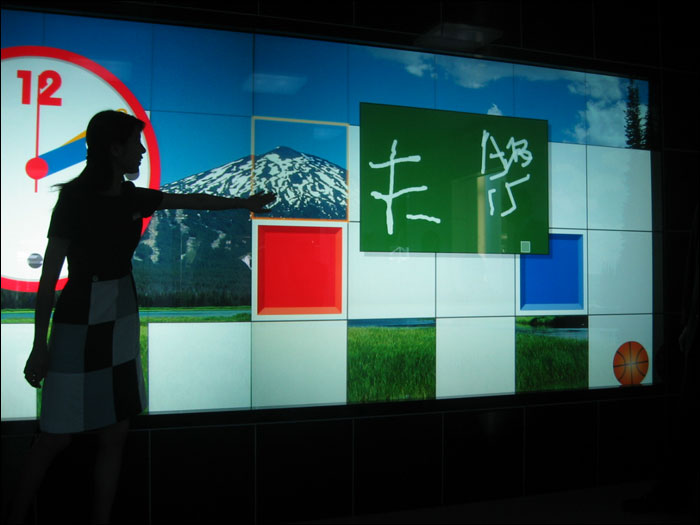
There will be 12 participants testing these gestures on a wall-sized display consisting of 32 screens powered by 16 dual core computers capable of displaying 20480 X 6400 pixels. They will be performing a pan-zoom task that requires users to navigate and zoom appropriately among a series of circles with some designated as targets that should be focused on. The participants will rank the gestures during and after the study.


Results - The researchers found that as predicted two-handed gestures were faster than one handed ones and the 1D path gestures were the fastest of the 3 spaces. To the researchers surprise, linear gestures were faster than circular ones. Overshooting with circular gestures helps to explain why linear gestures performed better. Participant feedback supported the claims that two-handed gestures would be preferred to one-handed ones and that linear was preferred over circular gestures. The fastest overall gestures were two-handed linear ones in both the 1D and 2D space. 


Conclusion - The researchers conclude by stating that they have provided more data to help with developing gestures for the mid-air space. They also state that gestures in the 1D and 2D space should not be forgotten as wall-sized displays become more common because they are less error prone and less tiring than gestures in the 3D space.


Discussion


I think the researchers achieve the goal of developing effective mid-air interaction techniques for wall sized displays. It's very interesting that the hardware based input methods were found to be preferable in many instances. We get caught up in movies today and think that free hand interaction is the ultimate goal for all input but studies like this show that those gestures actually have some hefty side affects that cannot be ignored when compared side by side with devised based input.

Thursday, October 20, 2011

Paper Reading #21: Human model evaluation in interactive supervised learning


Human Model Evaluation in Interactive Supervised Learning


AuthorsRebecca Fiebrink, Perry R. Cook, and Daniel Truema


Authors BiosRebecca Fiebrink is an assistant professor at Princeton University in the department of computer science and music and has a PhD from Princeton.
Perry R. Cook is a professor emeritus at Princeton University and has a PhD from Stanford.
Daniel Truema teaches various music courses at Princeton University and is an accomplished composer and performer on the fiddle and laptop.


VenueThis paper was presented at the CHI '11 Proceedings of the 2011 annual conference on Human factors in computing systems.


Summary


Hypothesis - In this paper, researchers explain that machine learning can be a powerful tool in processing large amounts of data and generating output on actionable items but the manner in which these systems learns if often static providing little to no feedback to the user performing the training. The researchers propose a system that allows trainers to supervise machine learning and provide valuable information regarding why certain output is generated and suggesting ways to fix problems. The hypothesis is that a system such as this can give users more of the information they want and help them build better machine learning applications.


Content - The researchers develop a generic tool, called the Wekinator, that implements basic elements of supervised learning in a machine learning environment to recognize physical gestures and label them as a certain input. They chose this application because gesture modeling is one of the most common uses of machine learning and music naturally is gesture driven at times like recognizing a certain gesture as a certain pitch.


Methods - 3 studies were conducted in evaluating the Wekinator:
A) The first study consisted of 7 composers working to refine the Wekinator to control new instruments that existed on the computer only and responded to gesture input. The participants trained the system once a week and made suggestions that were acted upon in between sessions.
B) The second study focused on the supervised learning aspect of the system and observed 21 students in their use of the Wekinator to produce new instruments controlled by certain gestures (one continuously controlled adjusting to changes in gesture in real-time). The students' actions were recorded by the software and they filled out questionnaires.
C) The final study consisted of a professional cellist working with the researchers to classify several gestures that capture many properties of a bow as it is used to play the cello. After the system captures this data, it should be able to capture the notes being played and add them to a composition on a computer.


Results - The studies found that most of the participants chose to train the system by editing the training data. In studies B and C, the researchers found that the participants used cross validation on occasion to observe how accurate their systems were performing and evaluating new ones at the same time. In contrast direct evaluation was used more frequently in all 3 studies and allowed for quick validation that a system was performing as expected. Subjective evaluation allowed the cellist in study C to fix mistakes made in training not caught in cross validation. Many participants noted that they got better in providing training data as the study went on indicating success in a primary goal of the system. At the conclusion of all the studies, most participants praised the Wekinator as working extremely well in accomplishing the tasks they had wanted.


Conclusion - The researchers conclude by saying that supervised learning has a place in machine learning but users must evaluate what qualities they are looking for beforehand as some things are not yet handled in a particularly successful fashion like accuracy and should not be relied on.


Discussion


I think the researchers achieve their goal of proving that supervised learning benefits the users in building a better model. This is interesting because machine learning is still in a young stage of life and studies like this make adoption easier and more practical than ever before.